Cupcake Order Form: A Five-Step Guide
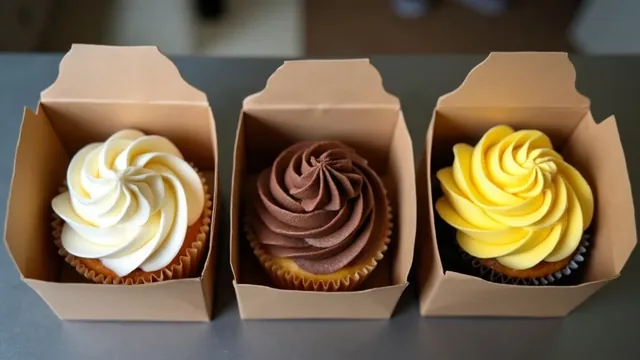
Cupcakes sell by the dozen, and a form built for one cake does not fit. A cupcake order form needs a count, a flavor split that adds up to that count, and a box size.
Selling cupcakes by the dozen changes the form. You count, you split and you box. The five steps below follow that order.
A cupcake order is a sum before it is a flavor.
| Step | What to do | What to watch for |
|---|---|---|
| 1 | Sell in set counts | Half dozen and dozen, nothing in between |
| 2 | Split the flavors | The flavors must add up to the count |
| 3 | Pick the boxes | Whole boxes only |
| 4 | Note frosting and toppings | Anything that needs the fridge |
| 5 | Set pickup and allergies | Time window, nine allergens |
Step 1: Sell in set counts
Offer a half dozen and a dozen, and let the customer pick how many of each. Do not offer "any number". Odd counts mean odd boxes, and an odd box is a box you cannot stack.
The form needs one number box called "How many cupcakes". Everything else is checked against it.
Step 2: Let the flavors add up
Give each flavor its own line with its own count. A form that says "mixed, a few of each" will always make you ask a follow-up.
Here is a worked order. A customer wants 30 cupcakes, split as 12 vanilla, 12 chocolate and 6 lemon. Add the lines. 12 plus 12 plus 6 is 30. If the lines had added to 28 or 32, you would send the form back with one question.
| Flavor | Cupcakes |
|---|---|
| Vanilla | 12 |
| Chocolate | 12 |
| Lemon | 6 |
| Total | 30 |
Step 3: Pick the boxes
Turn the count into boxes. Thirty cupcakes fit in two boxes of twelve and one box of six, which is 12 plus 12 plus 6. That is three boxes and no empty spaces.
Keep the box size on the form, because it decides what you buy and how much space you need in the fridge or the car. Whether to charge for the box is your call. Many bakers fold the box into the price per dozen, which keeps the form simple. If a customer asks for 30 in "one big box", tell them you only pack by the dozen.
Show the price per dozen and the total
Put your price per dozen on the form and let the customer see the sum. For example, at $36 a dozen and $20 a half dozen, the 30-cupcake order costs 12 plus 12 at $36 each, plus 6 at $20. That is $72 plus $20, which is $92. Those prices are an example. Use your own.
Add a minimum order, such as one half dozen, so nobody asks for three cupcakes.
A cupcake order form for frosting and toppings
Give frosting, toppings and decorations a line of their own. Most of a cupcake is frosting, and the frosting decides how long it keeps.
Some cottage food laws limit what can be sold. Alabama's extension service says baked goods with a component that requires refrigeration, such as cakes with a whipped topping, cannot be sold directly to the consumer. Check your own state before you list cream cheese or whipped frostings on the form.
Step 4: Note anything that needs the fridge
If a frosting must stay cold, say so on the form and tell the customer how long the box can sit out. The U.S. Food and Drug Administration says foods that need refrigeration should not sit at room temperature for more than two hours, and only one hour if the air is above 90 °F.
A box in a warm car on a summer afternoon is the case to plan for. Ask the customer how far they are driving.
Step 5: Set the pickup and ask about allergies
Ask for a pickup window, such as 2:00 to 2:30, and a single allergy line. The FDA lists nine major food allergens. They are milk, eggs, fish, crustacean shellfish, tree nuts, peanuts, wheat, soybeans and sesame. Cupcakes often carry wheat, milk and eggs before anything else is added.
Write "none" on the form when nobody has an allergy, so a blank always means a missing answer.
Cake pops follow the same sum
A cake pop order form is a cupcake order form with a different box. Count the pops, split the flavors so they add to the count, and pick the box that holds your usual number.
Cake pops can sit on the same form as a second item. Add a line for the pop count, a line for its flavor split and a line for its box, under the cupcake lines. The extra line to add is the stick or stand. Ask whether the customer wants them standing in a block or laid flat in a box, because the packing differs.
What a cake-sized row can and cannot do
The Cake Order Form was built around a cake, not a cupcake. Its columns are date needed, size, flavor, filling, frosting, writing, servings, allergens and a status you pick from a list. You can read size as the box and servings as the cupcake count, and write the split in the flavor cell, as in "12 vanilla, 12 chocolate, 6 lemon".
The file does not add the flavor lines for you, and it has no column for box count. You check the sum by eye. If you sell mostly cupcakes in many flavor splits, a form you build yourself with a column per flavor may suit you better.
The file opens in Excel. For Google Sheets, upload it to Google Drive and open it there. Its first tab, How to use, explains the sample row in terms of cells and drop-downs instead of menu clicks, so it reads the same in both apps.
Worth $4.99? Only if you want the drop-down and the servings total ready-made. A free document with your count, split and box lines costs nothing and works.
Conclusion
A cupcake order form is three numbers that must agree: how many, how they split, and how they are boxed. Write the count first, check that the flavors add up to it, then pick boxes. If the three numbers match on the form, they will match in the kitchen. The same method works for cake pops, with a different box size.
Sources
- U.S. Food and Drug Administration, Are You Storing Food Safely? (n.d.)last checked October 7, 2026
- Alabama Cooperative Extension System, Alabama Cottage Food Law (2024)last checked October 7, 2026
- U.S. Food and Drug Administration, Food Allergies (n.d.)last checked October 7, 2026